
How to Charge a 510 Battery: Complete Safety Guide (2026)

Updated: February 16, 2026
Charging your 510 battery correctly isn’t just about plugging it in—it’s about maximizing battery life, preventing damage, and avoiding the frustration of a battery that won’t charge or dies prematurely. In 2026, most cart batteries use USB-C charging with built-in safety features, but many users still struggle with charging problems, use the wrong chargers, or unknowingly shorten their battery’s lifespan. Whether you have a modern USB-C battery, an older eGo-style threaded charger, or a premium wireless charging model, this complete guide covers everything you need to know about charging safely, troubleshooting problems, and getting the most life out of your 510 battery.
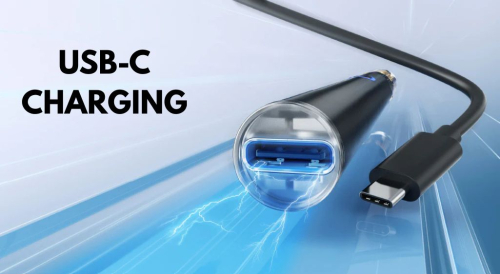
Modern 510 Battery Charging Methods (2026)
The way we charge cart batteries has evolved significantly. Here are the three main charging methods you’ll encounter in 2026.
USB-C Charging (Most Common)
What it is: A small USB-C port built into the battery (usually at the base) that accepts a USB-C cable.
Why it’s the standard:
- Reversible connector – Plugs in either direction, no more fumbling
- Faster charging – Typically 30-50% faster than Micro-USB or threaded chargers
- More durable – Rated for 10,000+ plug cycles vs. 5,000 for Micro-USB
- Universal compatibility – Same cable as modern phones, tablets, laptops
- Future-proof – Industry standard going forward
Common batteries with USB-C:
- Airis 350mAh VV Button Battery – $9.99
- Airis Cube 650 & 900 Dual-Charge – Starting at $16.99
- Cartisan 900mAh VV Dual-Charge – $16.99
How to charge: Simply plug the USB-C cable (included with battery) into the port and connect to any standard USB power source. Red/orange LED indicates charging; green LED or no light indicates fully charged.
eGo-Style Threaded Chargers (Legacy)
What it is: A USB cable with a threaded connector that screws onto the 510 threading where your cartridge attaches.
Still common on:
- Older pen-style batteries (pre-2020 models)
- Budget batteries under $10
- Traditional eGo-T and similar designs
Pros:
- Simple, reliable design
- Inexpensive to replace ($1.99)
- Works with most standard USB ports
Cons:
- Slower charging (1-2 hours typical)
- Wears out battery threading over time
- Can damage connection plate if over-tightened
- Can’t use battery while charging
Examples:
How to charge: Unscrew your cartridge, screw the charger onto the battery’s 510 threading (hand-tight only—NEVER over-tighten), plug USB end into power source. See the “Legacy Charger Safety” section below for critical tips.
💡 Upgrading from Threaded Chargers? If you’re still using an eGo-style threaded charger, consider upgrading to a USB-C battery. The convenience and battery longevity improvements are worth it. See our USB-C cart batteries starting at $9.99.
How Long Does It Take to Charge a 510 Battery?
Charge time depends on battery capacity (mAh) and charging method. Here’s what to expect:
Quick Reference Table:
| Battery Size | USB-C Charging | Wireless Charging | Threaded Charger |
|---|---|---|---|
| 350mAh | 25-35 minutes | 30-40 minutes | 40-50 minutes |
| 510mAh | 40-50 minutes | 45-55 minutes | 55-70 minutes |
| 650mAh | 50-65 minutes | 60-75 minutes | 70-90 minutes |
| 900mAh | 65-80 minutes | 75-90 minutes | 90-110 minutes |
| 1100mAh | 80-100 minutes | 95-120 minutes | 110-140 minutes |
Note: Times assume charging from near-empty (10-20%) to full (100%). A partially depleted battery will charge faster. For a complete breakdown of battery capacities and usage times, see our Cart Battery mAh Size Guide.
Factors That Affect Charge Time:
- Power source output – Wall adapters charge faster than computer USB ports
- Cable quality – Cheap cables can significantly slow charging
- Battery age – Older batteries charge more slowly (and hold less charge)
- Temperature – Charging is slower in very cold or very hot conditions
- Current battery level – Charging from 50% to 100% is faster than 0% to 50%
What Chargers to Use (and What to AVOID)
Using the wrong charger is the #1 cause of premature battery failure. Here’s what you need to know.
✅ Safe Chargers to Use:
1. The Original Cable That Came With Your Battery
This is always the safest option. Manufacturers design the included cable to match the battery’s specifications exactly.
2. Standard 5V USB Wall Adapters
Any basic USB wall adapter that outputs 5V / 1A (5 watts) is safe. Examples:
- Old iPhone cube chargers (5W models)
- Basic Samsung wall adapters
- Generic 5V USB adapters from reputable brands
3. Computer USB Ports
Safe but slower. Standard USB 2.0/3.0 ports output 5V at 0.5-0.9A, which is perfectly fine for cart batteries. Charging will just take longer than a wall adapter.
4. Car USB Ports
Most car USB ports are 5V, but check the label. Avoid “fast charge” car ports unless your battery specifically supports them.
5. Manufacturer-Approved Replacement Cables
If you lost your original cable, buy a replacement directly from the battery manufacturer or a retailer that specifies compatibility with your exact battery model.
❌ Dangerous Chargers to AVOID:
1. Fast Chargers / Quick Charge / Turbo Chargers
Examples of what to avoid:
- Qualcomm QuickCharge (9V, 12V, or 20V output)
- USB Power Delivery (USB-PD) fast chargers
- iPhone “fast charge” bricks (18W, 20W, 30W models)
- Samsung Adaptive Fast Charging
- Any charger advertising “Rapid Charge” or “Turbo Charge”
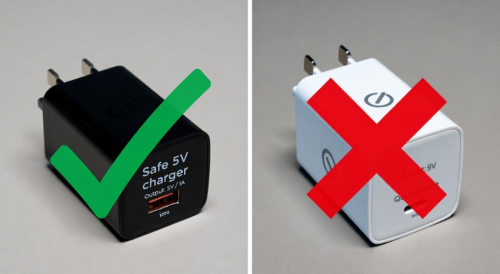
Why they’re dangerous: These chargers output higher voltage (9V, 12V, or even 20V) instead of the standard 5V that vape batteries expect. This can:
- Fry the battery’s internal circuitry immediately
- Cause thermal runaway (battery overheating)
- Degrade battery capacity by 50%+ after just a few charges
- Create fire/explosion risk in extreme cases
2. Tablet Chargers
Tablet chargers often output 12V or higher. Even if they’re 5V, they may push too much current (2A-3A) which can overheat small cart batteries designed for 0.5-1A.
3. Laptop USB-C Ports (Some Models)
Many modern laptops have USB-C ports that output 20V for charging the laptop itself. While most have safety negotiation, it’s risky. If you must use a laptop USB-C port, use an older USB-A port instead (always 5V).
4. Random/Unknown Cables from Other Devices
Just because it physically fits doesn’t mean it’s safe. Different devices use different charging protocols. Always verify the cable is designed for vape batteries or outputs standard 5V.
⚠️ Critical Safety Warning: When in doubt, check the charger label. It should say “Output: 5V / 1A” or “Output: 5V / 0.5A-1A”. If it says 9V, 12V, 20V, or anything other than 5V, DO NOT USE IT with your cart battery.
How to Identify a Safe Charger:
- Check the label on the wall adapter (the cube part, not the cable)
- Look for “Output:” specification
- Verify it says 5V (sometimes written as 5.0V or 5VDC)
- Current (amperage) should be 0.5A to 2A (written as 500mA to 2000mA or 0.5A to 2A)
- Total wattage should be 5W or less (Watts = Volts × Amps, so 5V × 1A = 5W)
Step-by-Step: How to Charge Your 510 Battery Safely
Follow these steps for safe, optimal charging every time.
For USB-C or Micro-USB Batteries:
- Turn off your battery (optional but recommended) – Click the button 5 times to power off. This reduces heat generation during charging.
- Keep cartridge attached (optional) – You can charge with or without the cart attached. Leaving it on helps prevent dust/debris from entering the 510 connection.
- Plug cable into battery first – Insert the USB cable into your battery’s charging port.
- Connect to safe power source – Plug the other end into a 5V wall adapter or computer USB port.
- Check for charging indicator – LED should turn red, orange, or start blinking to indicate charging has begun.
- Wait for full charge – LED will turn green, turn off, or stop blinking when complete (see charge times above).
- Unplug promptly – While overcharge protection exists, it’s best practice to unplug within an hour of reaching full charge.
- Turn battery back on (if you turned it off) – Click button 5 times to power on.
For eGo-Style Threaded Chargers:
- Turn off your battery – Click button 5 times to power off.
- Remove your cartridge – Unscrew the cart and set it aside upright to prevent leaking.
- Plug in the USB charger first – Connect the charger to your power source before attaching to battery. Green light should appear.
- Screw charger onto battery – Thread the charger onto the battery’s 510 connection. CRITICAL: Hand-tighten only until you feel resistance—DO NOT over-tighten.
- Confirm charging started – Light should change color (typically red) indicating charging has begun.
- Monitor for full charge – Light will turn green or turn off when complete.
- Unscrew charger carefully – Remove charger from battery.
- Reattach cartridge – Screw cart back onto battery (again, hand-tight only).
- Turn battery back on – Click 5 times to power on.
💡 Pro Tip: Place your battery on a non-flammable surface while charging (ceramic plate, metal tray, or concrete counter). Never charge on fabric, carpet, or near flammable materials. While modern batteries have safety features, this is basic fire safety practice.
Legacy eGo Charger Safety: Critical Tips
If you’re using an old-style threaded charger, these tips will prevent the most common problems.
Problem #1: Over-Tightening Damages the Connection Plate
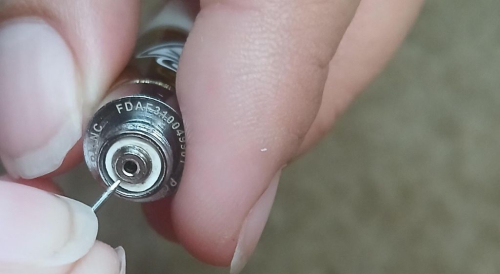
The issue: Many users screw the charger on too tight, thinking a tighter connection means better charging. This pushes down the small metal connection plate inside the battery’s 510 threading. Once pushed down, it won’t make contact with cartridges anymore.
The solution:
- Hand-tighten only – Screw until you feel resistance, then stop immediately
- Never use tools – No pliers, wrenches, or excessive force
- Listen for the connection – You’ll feel a slight “click” when threads engage properly
- If it’s stuck – Don’t force it. The threads may be damaged or cross-threaded
How to fix a pushed-down connection plate:
- Look inside the battery’s 510 connection
- You’ll see a small round metal plate in the center
- Use a small flathead screwdriver, safety pin, or toothpick
- Gently pry the plate up about 1-2mm (just barely visible above the threading)
- Be extremely gentle – if you damage this plate, the battery is ruined
- Test with your cartridge to confirm it makes contact
Problem #2: Charger Won’t Make Connection
The issue: You screw on the charger but the light doesn’t change—no charging indicator appears.
Possible causes and solutions:
1. Charger plugged in after attaching to battery
- Solution: Always plug the charger into power FIRST, confirm green light, THEN attach to battery
2. Dirty threading or connection plate
- Solution: Clean both the charger threads and battery threads with rubbing alcohol on a Q-tip. Let dry completely before connecting.
3. Connection plate pushed down (see Problem #1)
- Solution: Gently pry up the connection plate as described above
4. Dead/defective charger
- Solution: Try a different USB power source. If still no green light, the charger is dead. Replacement eGo chargers are $1.99.
Problem #3: Charger Gets Hot During Use
The issue: The charger or battery becomes uncomfortably warm/hot to touch while charging.
What’s normal: Slight warmth is expected—lithium-ion batteries generate some heat during charging.
What’s dangerous: If the battery is too hot to hold comfortably (>110°F / 43°C), or you notice any burning smell, bulging, or smoking:
- Unplug immediately
- Move to non-flammable surface (outside if possible)
- Do not use battery again – Dispose of it safely at a battery recycling center
- The charger or battery is defective
Prevention:
- Only use 5V chargers (see “What Chargers to Avoid” section)
- Don’t charge in direct sunlight or hot environments
- Don’t cover battery while charging (let heat dissipate)
- Replace old batteries showing signs of wear
Understanding Charging Indicator Lights
Your battery uses LED lights to communicate charging status. Here’s how to read them.
Common LED Patterns:
Solid Red or Orange Light (While Charging):
- Meaning: Battery is actively charging
- What to do: Nothing, this is normal. Wait for it to turn green or turn off.
Solid Green Light or No Light (While Plugged In):
- Meaning: Battery is fully charged (100%)
- What to do: Unplug and use. Leaving plugged in won’t damage it (overcharge protection exists), but it’s better to unplug.
Blinking Red Light (Slow Blink – Every 1-2 Seconds):
- Meaning: Battery is charging (some brands use blinking instead of solid light)
- What to do: Normal operation, wait for it to stop blinking or turn green.
Rapid Blinking (Multiple Fast Blinks):
- Meaning: Usually indicates a problem – could be connection issue, battery too hot, or charging error
- What to do: Unplug, wait 5 minutes for battery to cool, clean connections, try again. If persists, contact manufacturer.
No Light at All (While Plugged In):
- Meaning: Either (1) charger not working, (2) battery completely dead and needs time to show charging, or (3) battery is defective
- What to do: Wait 10-15 minutes—extremely dead batteries take time to show any sign. Try different USB port/adapter. If still nothing after 30 minutes, battery or charger is likely dead.
Brand-Specific Variations:
Different brands use different color patterns. Check your battery’s manual or product page for specifics, but these are common:
- Airis batteries: Red while charging, green when full
- CCELL batteries: Red while charging, blue when full
- Ooze batteries: Usually rainbow cycle while charging, solid color when full
- Yocan batteries: Often have OLED displays showing exact battery percentage
Pass-Through Charging: Can You Vape While Charging?
One of the most common questions we get: “Can I use my battery while it’s plugged in?”
What is Pass-Through Charging?
Pass-through charging is a feature that allows you to vape while your battery is plugged in and charging. The battery draws power from the USB connection to fire the cart while simultaneously charging the internal battery.
Which Batteries Support It?
Most modern USB-C batteries (2020+) support pass-through charging:
- ✅ Airis 350mAh, Cube 650, Cube 900
- ✅ Cartisan 900mAh VV
- ✅ Yocan Kodo, Kodo Pro
- ✅ Most premium batteries with USB-C
Batteries that DO NOT support it:
- ❌ eGo-style threaded chargers (can’t attach cart while charging)
- ❌ Most budget batteries under $10
- ❌ Some older Micro-USB models
Is It Safe?
Short answer: Yes, but not ideal for battery health.
The truth about pass-through charging:
Pros:
- ✅ Convenience – Never run out of power mid-session
- ✅ Safe – Modern batteries have protections against overheating
- ✅ Won’t damage battery immediately
Cons:
- ❌ Generates extra heat (charging + firing = more heat)
- ❌ Accelerates battery degradation over time
- ❌ Reduces total lifespan by ~10-20% with regular use
- ❌ Defeats the purpose of having a portable battery
Best practice:
- Occasional use is fine – If you’re in a pinch and need a hit while charging, go for it
- Don’t make it a habit – Try to charge fully before use
- Monitor temperature – If battery gets uncomfortably warm, stop and let it cool
- Unplug when full – Don’t leave it plugged in 24/7 for extended periods
Maximizing Battery Life & Health
Follow these practices to extend your battery’s lifespan and maintain performance.
Charge Cycle Best Practices:
1. Don’t Let It Die Completely
- Lithium-ion batteries degrade faster when fully depleted
- Sweet spot: Charge when battery reaches 15-30%
- Avoid: Running it to 0% regularly
- Exception: Fully discharge once every 30 charges to recalibrate battery meter
2. Don’t Keep It at 100% Constantly
- Leaving battery at 100% charge for weeks accelerates degradation
- Better: Charge to 80-90% for daily use, only full charge before long sessions
- For long-term storage: Store at 40-60% charge, not 100%
3. Charge Before It Gets Too Low
- Ideal range: Keep battery between 20% and 80% most of the time
- Think of it like filling your car’s gas tank at 1/4 full instead of driving on empty
4. Unplug When Full (or Close to It)
- While overcharge protection exists, prolonged “trickle charging” at 100% isn’t ideal
- Best practice: Unplug within 1 hour of reaching full charge
- Don’t: Leave plugged in overnight every single night
Temperature Management:
Optimal Charging Temperature: 50-86°F (10-30°C)
❌ Never charge in extreme temperatures:
- Too hot (>95°F / 35°C): Accelerates battery degradation, risk of damage
- Too cold (<32°F / 0°C): Charging is inefficient and can damage battery
Common mistakes:
- ❌ Charging in a hot car (can reach 150°F+ in summer)
- ❌ Charging in direct sunlight
- ❌ Charging in freezing garage in winter
- ❌ Charging on top of other hot electronics (laptop, game console)
✅ Best charging locations:
- Room temperature desk or counter
- Cool, well-ventilated area
- On non-flammable surface (ceramic, metal, concrete)
Storage Tips:
If storing battery for 2+ weeks:
- Charge to 40-60% (not full, not empty)
- Turn off (5 clicks to power off)
- Remove cartridge to prevent clogging
- Store in cool, dry place (room temperature)
- Recharge every 3 months if not using
Cleaning for Better Charging:
Every 2-4 weeks:
- Turn off and unplug battery
- Dip Q-tip in 90%+ rubbing alcohol
- Clean the 510 threading
- Clean the charging port (USB-C/Micro-USB)
- Let dry completely (5-10 minutes) before charging
Oil residue and dust can interfere with electrical connections, slowing charging or preventing it entirely.
Troubleshooting: Battery Won’t Charge
Work through these solutions in order when your battery won’t charge.
Problem: No Charging Light When Plugged In
Solution 1: Wait 10-15 Minutes
- Extremely dead batteries (0% or stored uncharged for months) take time to show any response
- Plug in and walk away for 15 minutes
- Check again—light may appear once battery reaches ~2%
Solution 2: Try Different Power Source
- Try different USB port (different computer port, different wall adapter)
- Some USB ports provide insufficient power
- Wall adapter is more reliable than computer USB
Solution 3: Try Different Cable (If Possible)
- Cable may be damaged even if it looks fine
- Try the cable on another device to test if it works
- Order replacement cable if needed
Solution 4: Clean Charging Port
- Turn off battery
- Use compressed air to blow out dust
- Use toothpick to gently remove lint/debris from USB port
- Dip Q-tip in rubbing alcohol and clean port gently
- Let dry 10 minutes, then try charging again
Solution 5: Check for Physical Damage
- Inspect USB port for bent pins or damage
- Look for cracks in battery casing
- Check for bulging (swollen battery is dangerous—dispose immediately)
- If damaged, battery needs replacement
Problem: Charges Very Slowly or Never Reaches 100%
Cause: Battery Degradation
- Batteries lose capacity over time (300-500 charge cycles typical lifespan)
- An old battery may only charge to 60-80% even after hours
- Solution: Replace battery. See “When to Replace” section below.
Cause: Insufficient Power Source
- Computer USB ports often provide only 0.5A instead of 1A
- Solution: Use a 5V / 1A wall adapter for faster, more complete charging
Cause: Charging in Extreme Temperature
- Cold batteries charge slowly and incompletely
- Solution: Bring battery to room temperature, wait 30 minutes, try again
Problem: Battery Drains Immediately After Charging
Cause 1: Battery is at End of Life
- After 300-500 charges, capacity degrades significantly
- May show “full” but actually only holds 30-50% of original capacity
- Solution: Replace battery
Cause 2: Cartridge is Damaged/Shorted
- A damaged cart can drain battery rapidly
- Solution: Remove cart, charge battery alone. If it holds charge without cart, the cart is the problem.
Cause 3: Battery Left On
- Some users forget to turn off their battery (5 clicks)
- Active battery drains even when not in use
- Solution: Always turn off after use
Problem: Charger Gets Hot, Battery Won’t Charge
Cause: Wrong Charger Voltage
- Using a fast charger or wrong voltage
- Solution: Check charger output—must be 5V. Replace with correct charger immediately.
Cause: Internal Short Circuit
- Battery is damaged internally
- Solution: Stop using immediately. Do not attempt to charge. Dispose safely.
⚠️ When to Stop Troubleshooting: If your battery shows any of these danger signs, stop using it immediately and dispose safely: (1) Swelling/bulging, (2) Extreme heat (too hot to hold), (3) Strange chemical smell, (4) Hissing or popping sounds, (5) Visible damage to casing. Take to a battery recycling center—do not throw in regular trash.
When to Replace Your Battery
All batteries have a finite lifespan. Here’s how to know when it’s time for a new one.
Expected Lifespan:
Charge Cycles: 300-500 full charge cycles (0% to 100%) before significant degradation
Calendar Time:
- Heavy users (charge daily): 6-12 months
- Moderate users (charge 2-3x/week): 12-18 months
- Light users (charge weekly): 18-24 months
Signs It’s Time to Replace:
1. Significantly Reduced Runtime
- Battery that used to last all day now dies by noon
- Needs charging 2-3x as often as when new
- Only provides 10-20 hits before dying (used to give 50-100)
2. Won’t Hold a Charge
- Shows 100% charged but dies within minutes of use
- Never reaches 100% even after hours of charging
- Drains while sitting unused overnight
3. Physical Damage or Wear
- Cracked or damaged casing
- Worn/stripped 510 threading
- Charging port damaged or loose
- Button sticks or doesn’t click properly
4. Erratic Behavior
- Turns on/off randomly
- LED flashes unusual patterns
- Gets excessively hot during normal use
- Voltage settings change by themselves
5. Safety Concerns
- Any bulging or swelling
- Strange smells (sweet, chemical, or burning)
- Hissing or popping sounds
- Corrosion or leaking
Battery Replacement Recommendations:
When it’s time to upgrade, consider these modern options:
Budget-Friendly ($10-15):
- Airis 350mAh VV – $9.99 – USB-C, variable voltage, compact
- Airis Mystica 2 – $9.99 – Ultra-discreet, auto-draw, 400mAh
Mid-Range ($15-25):
- Airis Cube 650 – $16.99 – Dual wireless + USB-C, lifetime warranty
- Cartisan 900mAh VV – $16.99 – Huge capacity, dual charging
Premium ($25+):
- Airis Mystica Ace – $24.99 – OLED display, exact voltage control
- Yocan Kodo Pro – $29.99 – Premium build, ultra-portable
See our complete 510 Cart Battery Collection for all options.
Frequently Asked Questions
Q: How do I know when my battery is fully charged?
A: The LED indicator will turn green, turn off completely, or stop blinking (depending on brand). Most batteries take 30 minutes to 2 hours depending on capacity. Check the table in the “How Long Does It Take” section above for your specific battery size.
Q: Can I use my phone’s fast charger with my vape battery?
A: No. Fast chargers (QuickCharge, USB-PD, 18W+ iPhone chargers) output 9V-20V instead of the 5V your battery needs. This will damage or destroy the battery. Only use standard 5V chargers. Check the charger label—it must say “Output: 5V”.
Q: Why won’t my eGo charger work with my battery?
A: Most common causes: (1) You screwed it on too tight, pushing down the connection plate, (2) Threading is dirty—clean with rubbing alcohol, (3) You attached battery before plugging charger into power—always plug in charger first, or (4) Charger is dead—they’re only $1.99 to replace.
Q: Is it bad to leave my battery charging overnight?
A: Modern batteries have overcharge protection, so it won’t explode or catch fire. However, leaving it at 100% charge for hours/days does accelerate long-term degradation. Better practice: unplug within 1 hour of reaching full charge. Or charge in the morning while getting ready instead of overnight.
Q: My battery charges to 100% but dies in 10 minutes. What’s wrong?
A: Your battery has reached end-of-life. After 300-500 charge cycles (typically 6-18 months of use), capacity degrades significantly. The battery meter may show 100% but actual capacity is only 20-30% of original. Time to replace it.
Q: Can I charge my battery in the car?
A: Yes, but verify your car USB port outputs 5V (most do). Avoid “fast charge” car ports unless your battery specifically supports them. Also avoid charging in extremely hot cars (summer) or extremely cold cars (winter)—bring battery inside to room temperature first.
Q: How often should I charge my 510 battery?
A: Charge when it reaches 15-30% for optimal battery health. Don’t wait until it’s completely dead (0%) regularly, and don’t leave it at 100% for days. The sweet spot is keeping it between 20-80% most of the time. See the “Maximizing Battery Life” section for details.
Q: What does it mean when my battery blinks while charging?
A: Slow blinking (every 1-2 seconds) is normal—it means charging is in progress. Rapid blinking usually indicates a problem (connection issue, too hot, or error). If rapid blinking occurs, unplug, let cool 5 minutes, clean connections, and try again.
Q: Can I use a wireless phone charger for my vape battery?
A: Only if your battery specifically supports wireless (Qi) charging. Most batteries don’t have this feature. Batteries with wireless charging include the Airis Cube series and Cartisan 900mAh VV. Regular batteries won’t charge on wireless pads—they need the USB cable.
Q: My battery won’t charge at all. Is it dead?
A: Not necessarily. Try these troubleshooting steps first: (1) Wait 15 minutes—extremely dead batteries take time to show response, (2) Try different USB port or wall adapter, (3) Clean charging port with compressed air and rubbing alcohol, (4) Try a different cable if available. If none of these work after 30 minutes, the battery is likely dead and needs replacement.
Related Guides & Resources
Master every aspect of your 510 battery:
- How to Turn On Your Vape Battery – Complete guide to activation and button functions
- Cart Battery mAh Size Guide – Detailed battery capacity and runtime information
- Fix a Non-Charging Battery – Advanced troubleshooting when nothing works
- Best Voltage for Vape Cartridges – Optimize your voltage settings
- 510 Thread Battery Complete Guide – Everything about 510 batteries
- Coolest Battery Features – Modern battery innovations explained
Ready to Upgrade to USB-C Charging?
Shop modern cart batteries with fast USB-C charging:
✅ FREE SHIPPING on orders $40+
✅ Same-day dispatch before 3pm EST
✅ Lifetime warranty on select models

Written by Marc Pitts
Marc is the CEO of Discount Vape Pen and has spent over 11 years in the vape industry. He began his career owning and operating brick-and-mortar vape shops, giving him hands-on experience with both products and customer needs. A Kean University graduate from Westfield, NJ, Marc combines retail expertise with a deep understanding of the evolving vaping landscape.
Outside of work, Marc loves cooking Italian food, swimming, playing tennis, and attending Broadway shows — a true theater kid at heart. Meet all our Discount Vape Pen Authors here.