
How to Maintain Your 510 Cart Battery (So It Lasts for Years)

A decent 510 battery should last 1–2 years with moderate use. A well-maintained one can push 3 years. A neglected one? You’ll be shopping for a replacement in 6 months.
The difference isn’t luck — it’s basic maintenance. We’re talking 5 minutes a week, tops. Clean the connection, charge it properly, store it right, and your battery will stay reliable long after your friends are tossing theirs.
This guide covers everything: routine cleaning, proper charging habits, storage, common mistakes that kill batteries early, and how to recognize when it’s actually time to replace one.
Routine Cleaning: The Single Best Thing You Can Do
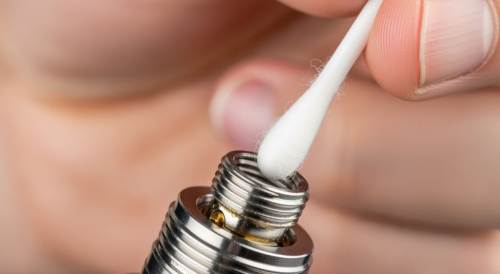
If you do nothing else from this entire guide, do this one thing: clean the 510 connection regularly.
The threaded connection point at the top of your battery is where electrical contact happens. Oil residue, dust, and oxidation build up on that contact over time. When the connection gets dirty, your battery can’t deliver consistent power to the cartridge. The result is weak hits, misfires, blinking error lights, and eventually a “dead” battery that’s actually just too dirty to make contact.
What You Need
– Cotton swabs (Q-tips)
– Isopropyl alcohol (70% or higher — 90% is ideal)
– A dry cloth or paper towel
– A toothpick or small paperclip (for stubborn buildup)
That’s it. You probably have all of this already.
How to Clean the 510 Connection (Step-by-Step)
Step 1: Power off the battery. Click the button 5 times rapidly. You don’t want it firing while you’re cleaning the contact points.
Step 2: Remove the cartridge. Unscrew it gently and set it aside upright (see our cartridge care guide for storage tips).
Step 3: Look inside the 510 connection. You’ll see a small center pin (usually spring-loaded) surrounded by threaded walls. Check for visible oil residue, dark buildup, or debris.
Step 4: Dip a cotton swab in isopropyl alcohol. You want it damp — not dripping. Squeeze out excess liquid.
Step 5: Clean the center pin. Gently press the swab onto the pin and twist. You’ll likely see brown or amber residue come off. If the pin is recessed, use the pointed end of the swab or a toothpick wrapped in a small piece of cotton.
Step 6: Clean the threading. Run the alcohol-dampened swab around the inside of the threaded walls. Rotate the swab as you go to pick up oil and debris.
Step 7: Dry it. Use a dry cotton swab or let it air-dry for 2–3 minutes. Don’t reattach the cartridge until the alcohol has fully evaporated.
Step 8: Clean the bottom of your cartridge too. While you’re at it, wipe the center pin and threading on the bottom of the cart. A clean battery plus a dirty cart still means a dirty connection.
How Often Should You Clean?
| Usage Level | Cleaning Frequency | Additional Trigger |
|---|---|---|
| Daily use | Once a week | Every time you swap carts |
| Several times a week | Every 2 weeks | If you notice weak hits |
| Occasional use | Monthly | Before first use after storage |
Pro tip: Get in the habit of cleaning every time you change cartridges. It takes 60 seconds and prevents the most common battery problem we see.
Cleaning the Charging Port
The USB-C or Micro-USB port on the bottom of your battery also collects dust and pocket lint over time. A dirty charging port causes slow charging, intermittent connection, or a battery that won’t charge at all.
How to clean it:
– Use a can of compressed air to blow out loose debris (short bursts, held a few inches away)
– For stuck lint, gently pick it out with a toothpick or SIM card removal tool
– Don’t use liquid inside the charging port — the pins are delicate and moisture can cause shorts
– Don’t use metal objects that could scratch the port contacts
How often: When you notice charging issues, or every 1–2 months as preventive maintenance.
Proper Charging Habits
How you charge your battery directly affects how long it lasts. Lithium-ion cells (the type in every 510 battery) have a finite number of charge cycles before they degrade. Good charging habits extend the total cycle count; bad habits shorten it.
The Do’s
Use the included cable or a confirmed compatible one. Not all USB cables deliver the same voltage and amperage. The cable that came with your battery is designed for its specific charging requirements. Using a fast-charger designed for a phone can overdrive a small 350mAh battery cell.
Charge on a hard, flat, non-flammable surface. A desk, countertop, or table is ideal. Not a bed, couch, or pile of papers. Lithium batteries generate heat while charging, and soft surfaces trap that heat.
Unplug when fully charged. Most modern batteries have overcharge protection circuits that stop current flow when the cell is full. But “most” isn’t “all,” and even with protection, leaving a battery on the charger for hours after it’s full adds unnecessary stress to the cell. When the LED turns green (or turns off), unplug it.
Charge before it’s completely dead. Lithium-ion batteries last longer when you keep them between 20% and 80% charge. Running a battery to absolute zero regularly accelerates degradation. When the LED turns red or you notice weaker hits, charge it — don’t wait for it to die completely.
For timing details on specific battery sizes, see our how long to charge guide.
The Don’ts
Don’t charge overnight. Even with overcharge protection, 8+ hours on a charger isn’t good for the cell. Most 510 batteries finish charging in 30–90 minutes. Plug it in while you’re watching a show, not while you’re sleeping.
Don’t charge in extreme temperatures. Below 32°F (0°C) or above 95°F (35°C) stresses the cell and can cause permanent capacity loss. Don’t charge a battery that’s been sitting in a cold car — let it warm to room temperature first.
Don’t use while charging. Pass-through charging (vaping while plugged in) is hard on the battery cell. It creates simultaneous charge and discharge, which generates excess heat and degrades the cell faster. If your battery supports pass-through, use it sparingly — not as your default.
Don’t charge from a laptop that’s also charging. This one’s subtle. When a laptop is charging, its USB ports can have inconsistent power output. Charging your battery from a wall adapter is more reliable and consistent.
Storage Best Practices
Daily Storage (Between Uses)
– Turn the battery off when not in use (5 clicks). This prevents accidental firing in a pocket or bag.
– Store upright — good for both the battery and the attached cartridge.
– Keep at room temperature (60–75°F).
– Avoid leaving in direct sunlight — the battery cell heats up faster than you’d think behind glass.
Long-Term Storage (Weeks to Months)
If you’re putting a battery away for a while:
Charge to approximately 50–60%. Storing a lithium-ion battery at full charge or completely empty both accelerate degradation. Mid-charge is the sweet spot for long-term cell health.
Remove the cartridge. A cart left attached for weeks can slowly leak oil into the battery connection, and the constant pin pressure can depress the center contact.
Store in a cool, dry location. A drawer or shelf at room temperature. Not in a bathroom (humidity) or garage (temperature swings).
Check every 4–6 weeks. Lithium batteries self-discharge slowly even when off. If you’re storing one for months, check the charge level periodically and top it up to 50% if needed. Letting it sit completely dead for months can cause the cell to drop below recoverable voltage.
Extending Your Battery’s Lifespan
Beyond cleaning and charging, these habits determine whether your battery lasts 8 months or 3 years.
Use Appropriate Voltage Settings
Running your battery at maximum voltage (4.0V+) all the time generates more heat, draws more current per hit, and wears the cell faster. Lower voltage settings (2.4V–3.2V) are gentler on the battery and extend its cycle life.
This doesn’t mean you can’t use higher voltage — just that making it your default shortens the battery’s total lifespan. For most oils, the 2.8V–3.4V range delivers great results without overworking the cell. See our voltage settings guide for oil-specific recommendations.
Don’t Chain-Vape
Taking hit after hit with no break generates cumulative heat in the battery cell. Most batteries have a 10-second auto-shutoff to prevent overheating, but continuous sessions of back-to-back hits still stress the cell.
Give your battery 15–30 seconds between hits. Your cartridge needs this time too — the wick needs to re-saturate with oil between draws.
Protect It Physically
Drops, impacts, and pressure damage lithium cells internally even if the outside looks fine. A battery that’s been dropped hard might work fine for weeks, then suddenly fail when the internal damage worsens.
Use a case or sleeve when carrying your battery, especially box-style mods that are more prone to pocket damage. Don’t toss it loose in a bag with keys and coins.
Water and moisture are also enemies. If your battery gets wet, turn it off immediately, dry the exterior, and let it air-dry for 24 hours before attempting to charge or use it. If it got submerged, replace it — water damage to lithium cells can create dangerous conditions.
Avoid Extreme Temperatures
This applies to use and storage. Lithium cells work best between 60–85°F. Outside that range, the cell’s internal resistance changes, which affects both performance and longevity.
Never leave your battery in a hot car, in direct sun, on a heater vent, or near other heat sources. Cold is less dangerous than heat, but repeated freeze-thaw cycles cause micro-damage to the cell structure over time.
How to Know When It’s Time to Replace Your Battery
Batteries don’t last forever. A typical 510 battery is good for 300–500 full charge cycles before noticeable degradation. Here’s what that looks like in real time:
| Usage Level | Typical Lifespan | With Good Maintenance |
|---|---|---|
| Heavy (30+ hits/day, daily charging) | 6–10 months | 10–14 months |
| Moderate (15–25 hits/day) | 12–18 months | 18–24 months |
| Light (5–10 hits/day) | 18–24 months | 24–36 months |
Signs of a Dying Battery
Rapidly draining charge. If a battery that used to last 2 days now dies in half a day with the same usage pattern, the cell has degraded and holds less charge. This is the most reliable indicator.
Inconsistent heating. Some hits feel normal, others feel weak or produce noticeably less vapor — even with the same cartridge and voltage setting. This indicates the cell can’t deliver consistent current output.
Charging problems. Takes much longer to charge than it used to, won’t reach 100%, or the charging LED flickers or cycles through colors erratically. These all point to cell degradation.
Physical swelling. If your battery looks puffy, warped, or the housing feels like it’s being pushed apart from inside — stop using it immediately. This is a swollen lithium cell, which is a safety hazard. Don’t charge it, don’t use it, and dispose of it at a battery recycling center.
Intermittent shutoffs. Battery turns off mid-hit or powers down on its own. After ruling out connection issues (troubleshooting guide), this usually means the cell voltage is dropping below operating threshold during use.
When to Replace vs. When to Clean
Before you replace, make sure the problem isn’t a dirty connection. Many batteries get tossed for problems that a 2-minute cleaning would fix. If cleaning the 510 connection and charging port doesn’t resolve the issue, and the battery is 6+ months old with daily use, it’s probably time for a new one.
Safe Battery Disposal
510 batteries contain lithium-ion cells that should never go in regular household trash. Lithium cells can puncture in compaction, short-circuit, and cause fires in garbage trucks and landfills. This actually happens — it’s a real problem.
Where to recycle:
– Best Buy (free battery recycling bin at every location)
– Home Depot and Lowe’s (battery recycling stations)
– Staples (accepts rechargeable batteries)
– Your local hazardous waste facility
– Some vape shops accept old devices
Before disposal: Discharge the battery as much as possible, tape over the contacts (electrical tape works), and place it in a plastic bag. This prevents accidental shorting during transport.
Frequently Asked Questions
Can I clean my 510 battery with water?
No. Water and electronics don’t mix, and even small amounts of moisture in the connection or charging port can cause shorts. Use isopropyl alcohol (70%+) — it evaporates cleanly without leaving moisture behind.
My battery center pin got pushed down. Can I fix it?
Usually, yes. Power off the battery, then use a toothpick or small flathead tool to gently lift the center pin back up. Be careful — you want it level with or slightly above the surrounding threading, not bent or pulled too high. If it springs back down immediately, the spring mechanism may be damaged and the battery needs replacement.
Should I fully drain my battery before charging?
No. This is a myth carried over from older nickel-cadmium batteries. Modern lithium-ion cells last longer with partial charge cycles. Charge when you’re at 20–30% rather than running it to zero.
How do I know if my battery has overcharge protection?
Any battery from a reputable brand (Yocan, CCELL, Ooze, Pulsar, Cartisan, Randy’s) includes overcharge protection as standard. If you bought an unbranded or very cheap battery (<$8) from an unknown source, it may lack this feature. When in doubt, unplug when the charging light turns green.
Why does my battery feel warm during use?
Slight warmth during use is normal — the cell is delivering current and generating heat. If it feels hot to the touch, stop using it. Excessive heat can indicate a short circuit, damaged cell, or incompatible cartridge. Let it cool completely before trying again, and inspect the 510 connection for damage.
Can I use compressed air to clean the 510 threading?
You can use it to blow out loose debris, but it won’t remove oil residue — that needs isopropyl alcohol. Use compressed air for the charging port (where liquid is risky) and alcohol swabs for the 510 connection (where oil buildup is the problem).
Do box-style batteries need different maintenance than pen-style?
The 510 connection maintenance is identical. Box-style batteries with OLED screens should have the screen wiped occasionally with a soft dry cloth. Their larger size makes them easier to clean, but the connection point and charging habits are the same.
Is it bad to leave my battery turned on all the time?
It’s not harmful to the battery itself, but it increases the risk of accidental firing in a pocket or bag, which wastes charge and could overheat the cartridge. Make it a habit to click 5 times to power off when you’re done. Takes one second.
Time for an Upgrade?
If your current battery isn’t holding charge or performing consistently, these reliable options are built to last:
Yocan Kodo Star — $16.99 — USB-C fast charging, puff counter to track usage, and a flat base that stands upright on any surface. Great everyday battery.
Cartisan Pro Pen Neo 900mAh — $14.99 — 900mAh capacity means fewer charge cycles and longer lifespan. Pen-style with variable voltage and preheat.
CCELL Kap Battery — $34.99 — Premium build quality from an industry-leading brand. Protective cap shields the cart and connection point. If you want a battery that lasts.
Continue Learning
Related guides:
- Cartridge Care & Storage Guide — the companion guide for cartridge-specific maintenance
- How Long to Charge a Cart Battery
- Cart Battery Not Working? Troubleshooting Guide
- Blinking Lights Guide (All Brands)
- Best Voltage Settings for Vape Cartridges
- How to Use a Cart Battery: Step-by-Step
- How to Unlock a Vape Pen

Written by Marc Pitts
Marc is the CEO of Discount Vape Pen and has spent over 11 years in the vape industry. He began his career owning and operating brick-and-mortar vape shops, giving him hands-on experience with both products and customer needs. A Kean University graduate from Westfield, NJ, Marc combines retail expertise with a deep understanding of the evolving vaping landscape.
Outside of work, Marc loves cooking Italian food, swimming, playing tennis, and attending Broadway shows — a true theater kid at heart. Meet all our Discount Vape Pen Authors here.