
Vape Battery Not Working? 10 Common Problems Fixed

Vape Battery Not Working? Here’s How to Fix It
You press the button. Nothing happens. Or maybe it blinks a few times and refuses to fire. Or your cart just won’t screw onto the battery in the first place.
Whatever the symptom, a 510 thread battery that won’t work is frustrating — especially when you’re not sure what’s wrong or whether you need to replace the whole thing.
Good news: most cart battery problems have simple fixes that take under 60 seconds. Before you throw anything away or spend money on a replacement, work through this guide. We’ve organized every common 510 vape battery issue by symptom so you can jump straight to your problem and get back to vaping.
→ Best Overall ($14.99): Yocan Kodo Pro — OLED screen, precise voltage, USB-C
→ Best for Thick Oils ($9.99): Airis Cube 900 — 900mAh, preheat, proven durability
→ Best Budget ($9.99): CCELL M4 — Simple buttonless, stainless steel build
Table of Contents
- Quick Diagnosis: What’s Your Battery Doing?
- Problem 1: Cart Won’t Screw On (Most Common)
- Problem 2: Battery Won’t Hit (No Vapor)
- Problem 3: Battery Blinks But Won’t Fire
- Problem 4: Battery Won’t Charge
- Problem 5: Weak Hits or Thin Vapor
- Problem 6: Burnt or Bad Taste
- Problem 7: Cart Feels Clogged
- Problem 8: Battery Won’t Turn On
- Problem 9: Auto-Draw Not Activating
- Problem 10: Battery Gets Hot
- Brand-Specific Troubleshooting (Cartisan, Yocan, CCELL, Pulsar)
- When to Replace Your Battery
- Preventing Problems Before They Start
- FAQ
Quick Diagnosis: What’s Your Battery Doing?
Find your symptom below and jump straight to the fix:
| Symptom | Most Likely Cause | Jump To |
|---|---|---|
| Cart won’t screw onto battery | Debris in threads, cross-threading, or 2g cart on standard battery | Problem 1 |
| Button lights up but no vapor | Connection issue between cart and battery | Problem 2 |
| Battery blinks 3 times then stops | Short circuit or connection error | Problem 3 |
| Battery blinks 10+ times | Dead battery, needs charging | Problem 4 |
| Vapor comes out but hits are weak | Low battery, wrong voltage, or dying cart | Problem 5 |
| Vapor tastes burnt or harsh | Voltage too high or cart is running dry | Problem 6 |
| Can’t draw air through the cart | Clogged cartridge | Problem 7 |
| Press button, absolutely nothing happens | Battery is off, dead, or locked | Problem 8 |
| Auto-draw won’t activate | Sensor blocked, cart loose, or dead battery | Problem 9 |
| Battery feels hot | Chain-vaping, short circuit, or internal damage | Problem 10 |
Problem 1: Cart Won’t Screw On to Battery
Your cartridge doesn’t thread smoothly onto your battery, won’t screw all the way in, or feels cross-threaded. This is one of the most-searched 510 battery problems — and almost always fixable in under a minute.
The Three Most Common Causes
1. Debris in the threads. Oil residue, pocket lint, or dust builds up in the threading grooves over time, preventing a clean connection. Clean both the battery’s female threads and the cart’s male threads with a rubbing-alcohol Q-tip (70% isopropyl or higher). Use a toothpick to clear any visible gunk from the thread grooves. This single fix resolves the majority of “cart won’t screw in” problems.
2. Cross-threading. If you started screwing the cart on at a slight angle, the threads have crossed. This feels like resistance or grinding right away. Stop turning immediately. Unscrew completely, realign the cart straight, and try again. Here’s the trick: start by turning the cart counter-clockwise until you feel a small “click” — that’s the threads dropping into the starting groove. Now turn clockwise gently. The cart should thread on smoothly with no resistance until it’s seated.
3. 2g or oversized cart on a standard battery. Large-format cartridges (2g, 2mL, and some 1g carts) are wider than standard carts — up to 14mm in diameter compared to the standard 10-11mm. If your cart is wider than the battery’s opening, it physically won’t fit. You need a battery designed for larger carts. See our 2G cart battery collection for batteries that fit oversized carts.
Other Possibilities
It’s not 510 threaded. Around 95% of carts use 510 threading, but some products use proprietary connections. Pod systems like JUUL, PAX Era, and Stiiizy pods use magnetic connections that are completely incompatible with 510 batteries. If your cart doesn’t have screw threads on the bottom, it’s not a 510 cart. For more on which cart standards work with which batteries, see our 510 Thread Explained guide.
Bottom of cart stuck in the battery. If the cart’s threaded base broke off and is stuck inside the battery, carefully use tweezers or needle-nose pliers to grip and unscrew the stuck piece. If it won’t come out, the battery is likely done — replace it.
Damaged threads. If threading on either the battery or cart is physically damaged (bent, stripped, flattened), no amount of cleaning will help. Examine both closely. If threads are damaged, that component needs to be replaced.
Problem 2: Battery Won’t Hit (No Vapor)
Your button lights up when you press it, but nothing comes out of the cart. The battery seems to be working — it just won’t produce vapor.
Cause: 90% of the Time It’s a Connection Issue
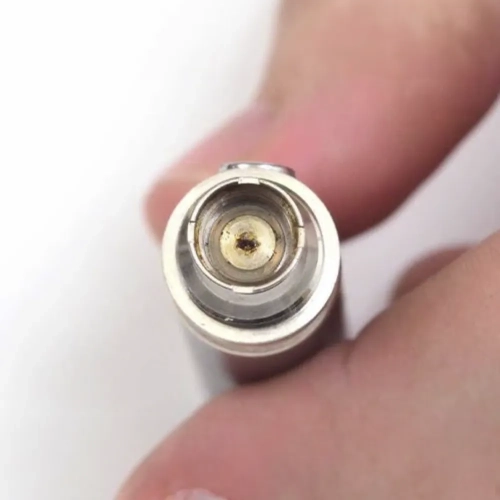
The most common reason a 510 thread battery won’t hit is that the electrical connection between the battery and cartridge isn’t making proper contact. There’s a small metal pin at the top of your battery and a matching contact on the bottom of your cart — if they’re not touching, no power flows.
Fix It Step by Step
Step 1: Unscrew the cart and reattach it. Remove the cartridge completely, then screw it back on gently — finger-tight only. Don’t crank it down. Overtightening is actually the most common cause of this problem because it pushes the center pin down too far. If you can feel resistance, stop turning.
Step 2: Check the center pin. Look at the top of your battery where the cart screws in. You should see a small metal pin in the center. If it’s pushed down flush with the threading, that’s your problem. Use a toothpick, paperclip, or small needle to very gently lift the pin up about 1mm. Don’t pry aggressively — you just need it to stick up enough to make contact.
Step 3: Clean both contact points. Dip a cotton swab in rubbing alcohol (70% isopropyl or higher) and gently clean the battery’s center pin and threading, then the cart’s bottom contact. Oil residue builds up here over time and blocks the electrical connection. Let both dry for 2-3 minutes before reconnecting.
Step 4: Try a different cart. If you have another 510 cartridge available, screw it on and test. If the second cart works, the problem is with your original cart, not the battery.
Step 5: Check that the battery is actually on. It sounds obvious, but confirm the battery is powered on. Most button batteries require 5 rapid clicks to turn on. The LED should flash 3 times to confirm.
For a deeper dive into connection issues and cleaning techniques, see our 510 Battery Maintenance & Care Guide.
Problem 3: Battery Blinks But Won’t Fire
You press the button and the LED blinks a specific number of times, then the battery shuts off without heating your cart. Different blink patterns mean different things.
What the Blinks Mean
| Blink Pattern | What It Means | Fix |
|---|---|---|
| 3 blinks | Short circuit or connection error — the battery detects a problem with the cart | Unscrew cart, clean contacts, reattach gently. Check that the cart isn’t damaged or leaking oil into the connection. |
| 4-5 blinks | Voltage setting change or lock/unlock confirmation | This might be normal. 3 clicks changes voltage. 5 clicks turns on/off. Check your manual. |
| 8-10 blinks | Battery is dead — needs charging | Plug in and charge fully (30-90 minutes). If it won’t charge, see Problem 4. |
| 10+ rapid blinks | Auto-shutoff triggered (held button too long, usually 8-10 seconds) | Release the button and wait a few seconds. Take shorter draws (2-4 seconds). |
| Continuous fast blinking | Short circuit, atomizer error, or internal fault | Remove cart immediately. Clean connections thoroughly. If it persists with no cart attached, the battery may be damaged. |
| Alternating colors | Usually voltage cycling or error code (varies by brand) | Check your battery’s user manual for brand-specific codes. |
Important: Blink patterns vary by brand and model. The table above covers the most common patterns, but your specific battery may differ. For a complete brand-by-brand breakdown, see our Blinking Lights Decoder Guide.
The Universal Fix for Most Blinking Issues
Before anything else, try this sequence — it resolves about 80% of blinking problems:
- Unscrew the cartridge completely
- Clean the battery’s 510 connection with a rubbing-alcohol Q-tip
- Clean the cart’s bottom contact the same way
- Let both dry for 2-3 minutes
- Gently lift the battery’s center pin with a toothpick (just 1mm)
- Reattach the cart — finger-tight only, do NOT overtighten
- Try firing again
If it still blinks after this, try a different cartridge. If it blinks with no cart attached at all, the battery itself has a problem.
Problem 4: Battery Won’t Charge
You plug in the battery and nothing happens — no light, no indicator, nothing.
Step-by-Step Fix
Step 1: Try a different cable. USB cables fail more often than batteries do. If you’re using a USB-C battery, try another USB-C cable you know works. Same for micro-USB — swap the cable first.
Step 2: Try a different power source. Switch from computer USB port to a wall adapter, or vice versa. Some USB ports don’t deliver enough power. Avoid fast-charging phone adapters (too much wattage) — standard 5V/1A wall adapters work best.
Step 3: Clean the charging port. Use a can of compressed air to blow out dust or debris. For stubborn gunk, use a toothpick to gently clean the port. For eGo-style screw-on chargers, clean both the battery threading and charger threading with a rubbing-alcohol Q-tip.
Step 4: Wait 15 minutes. If your battery is completely dead (0%), it may take 10-15 minutes of being plugged in before the LED shows any sign of life. Don’t assume it’s broken after 30 seconds — give it time.
Step 5: Check for physical damage. Look for dents, swelling, corrosion on the charging port, or any visible damage. If the battery body is swollen or deformed, stop using it immediately — this is a safety hazard. Dispose of it at a battery recycling center.
Step 6: Check the charger itself. If you’re using an eGo-style screw-on charger (common with pen-style batteries), the charger might be the problem. These chargers are inexpensive and fail frequently. Try a replacement charger before giving up on the battery.
For complete charging instructions and troubleshooting, see our How to Charge a 510 Battery Guide and How Long to Charge Guide. For extended fixes when nothing else works, see our Non-Charging Battery Troubleshooting.
Problem 5: Weak Hits or Thin Vapor
The battery fires and you get some vapor, but hits feel weak, thin, or unsatisfying compared to what you’re used to.
Common Causes and Fixes
Low battery. As battery charge drops, power output decreases. Weak hits are often the first sign you need to recharge. If your LED shows red or orange, charge it up and test again.
Voltage too low. If you’re on a variable voltage battery, your setting might be too low for your oil type. Thick distillate and live resin typically need 2.8V-3.4V minimum. Try bumping up by 0.2V increments until hits feel satisfying.
Cart is almost empty. When oil gets low, the coil can’t fully saturate, resulting in wispy, unsatisfying hits. Check your oil level — if you can see the coil or the glass looks nearly clear, it’s time for a new cart.
Cold oil. In cold weather or air-conditioned rooms, oil thickens and flows slowly. Use the preheat function (2 quick clicks on most batteries) to warm the oil before hitting. If your battery doesn’t have preheat, hold it in your closed hand for 30-60 seconds to warm it with body heat.
Dirty connection. Even if the battery fires, a dirty connection reduces power transfer. Clean both contact points with rubbing alcohol as described in Problem 2.
Cart is old or degraded. Cartridge coils have a lifespan. If you’ve been using the same cart for weeks and hits have gradually gotten weaker, the coil may be worn out. Time for a fresh cart. See our How Many Puffs Per Cart Guide for expected lifespans.
Problem 6: Burnt or Bad Taste
Your hits taste burnt, harsh, or chemically. This is unpleasant and can also mean you’re damaging the cartridge.
Causes and Fixes
Voltage is too high. This is the most common cause of burnt taste. Higher voltage = more heat, and too much heat literally burns the oil and terpenes instead of vaporizing them. Lower your voltage by one setting and test. For most carts, the sweet spot is 2.4V-3.2V for flavor. See our complete voltage settings guide for specific recommendations by oil type.
Cart is running dry. When oil drops below the coil intake holes, the coil heats dry wick material instead of oil — that’s the burning taste. Check your oil level. If it’s low, keep the cart upright to let remaining oil settle toward the coil, and take shorter, gentler draws.
Chain-vaping. Taking hit after hit without pause overheats the coil and doesn’t give oil time to re-saturate the wick. Wait 15-30 seconds between draws to let the coil cool and the wick absorb fresh oil.
New cart needs priming. If this is a freshly attached cartridge, the wick might not be fully saturated yet. Let a new cart sit on the battery for 5-10 minutes before your first hit. Use preheat (2 clicks) to gently warm the oil without a full draw.
Damaged or expired cart. Old cartridges, especially those exposed to heat or sunlight, can develop off-flavors. If the oil looks unusually dark, cloudy, or has separated, it may be degraded. Learn proper storage in our Cartridge Care & Storage Guide.
Problem 7: Cart Feels Clogged
You try to draw and it feels like sucking through a blocked straw — restricted airflow, very little or no vapor. The battery may be working fine, but the cart itself won’t let air through.
Quick Fixes
Use the preheat function. If your battery has preheat (most variable voltage batteries do), double-click the button. This runs a low-power 10-15 second warming cycle that melts solidified oil blocking the airflow. Preheat is the fastest, most effective clog fix.
Take a dry draw. Remove the cart from the battery. Put your lips on the mouthpiece and draw firmly without firing. This can dislodge light clogs through suction alone. Pull 3-5 times.
Warm with body heat. If you don’t have preheat, hold the cartridge in your closed fist for 60 seconds, or hold it against your body (pocket, under arm). The warmth thins the oil just enough to clear the passage.
Clear the mouthpiece. Oil can condense and solidify inside the mouthpiece. Use a toothpick or thin pin to gently clear any visible blockage from the mouthpiece opening. You can also try gently blowing through the mouthpiece (from the outside in) to push residue down.
Use a hair dryer on low. Briefly warm the cartridge with a hair dryer on the lowest heat setting. Hold it 6-8 inches away and apply heat for 10-15 seconds. This melts hardened oil without overheating the cart.
For the full breakdown of every clogging cause and solution, see our dedicated Clogged Cart Fix Guide.
Problem 8: Battery Won’t Turn On
You click the button repeatedly and absolutely nothing happens — no light, no blink, no response at all.
Fix It
Click pattern. Most 510 batteries require exactly 5 rapid clicks within 2 seconds to turn on. Click too slowly and it won’t register. Try again: five quick, deliberate clicks. The LED should blink 3 times to confirm it’s on. For a full walkthrough, see our How to Turn On a Vape Battery Guide.
Battery is dead. If it’s been sitting unused, the battery may have drained completely. Plug it in and wait at least 15 minutes before trying to turn it on again. Extremely dead batteries sometimes need time to “wake up” before showing any response.
It’s locked. Some batteries have a lock feature (separate from on/off) that disables the button even when powered on. This is often triggered by clicking the button 3 times or holding it for a specific duration. Check your manual for the unlock sequence. See our How to Unlock a Vape Pen Guide for brand-specific instructions.
Auto-draw battery. If you have a buttonless auto-draw battery, there IS no button to press. These activate when you inhale. Some hybrid models have both button and auto-draw — make sure you’re not looking for a button on a buttonless device. For more on activation types, see our Button vs Auto-Draw Guide.
Internal failure. If the battery won’t respond to charging or clicking after trying all the above, it may have an internal fault. Batteries have a limited lifespan (typically 300-500 charge cycles). If yours is old and unresponsive, it’s replacement time.
Problem 9: Auto-Draw Not Activating
You inhale through your auto-draw (buttonless) battery and nothing happens — no heat, no vapor, no LED light.
Causes and Fixes
Cart is too loose. Auto-draw sensors need the cart screwed in at the right tightness to detect airflow. If the cart is too loose, air bypasses the sensor. Tighten the cart slightly — a quarter-turn can make the difference.
Cart is too tight. Conversely, overtightening can push the center pin down and block the air path the sensor uses to detect your draw. Loosen the cart slightly and test.
Airflow holes are blocked. Auto-draw sensors detect airflow through tiny holes. If these are clogged with oil residue, pocket lint, or debris, the sensor can’t detect your inhale. Look for small air holes on the battery (usually near the top or along the base) and clear them with a toothpick.
Battery is dead. Auto-draw batteries don’t always have obvious indicators when dead. Plug it in and charge for at least 15 minutes, then try again.
Oil on the sensor. If oil has leaked from the cart onto the battery’s internal sensor, it can prevent activation. Remove the cart, use a Q-tip with rubbing alcohol to clean inside the 510 connector area, and let it dry completely before reattaching.
Sensor failure. Auto-draw sensors can fail over time, especially in cheaper batteries. If cleaning doesn’t fix it and the battery is charged, the sensor may be dead. Time for a replacement. The CCELL M4 and other reliable auto-draw cart batteries use higher-quality sensors that last longer.
Problem 10: Battery Gets Hot
Your battery feels warm or hot to the touch during use, and you’re worried it might be dangerous.
When It’s Normal
Slight warmth during use is completely normal — the battery is transferring electrical energy to heat a coil, so some heat generation is expected. If the battery feels warm (not hot) during or immediately after a session, that’s fine.
When It’s a Problem
Hot enough that it’s uncomfortable to hold. This is NOT normal. Stop using the battery immediately and set it on a non-flammable surface away from anything that could catch fire.
Causes of overheating:
Chain-vaping. Taking back-to-back hits without pause forces the battery to work continuously, generating excess heat. Wait 15-30 seconds between draws.
Short circuit. If the cart has a damaged coil or the connection is compromised, it can create a short circuit that generates heat. Remove the cart and see if the battery cools down. If it stays hot with no cart attached, stop using it immediately.
Voltage too high. Running at maximum voltage produces more heat. Lower your voltage setting.
Damaged battery. Internal damage from drops, water exposure, or age can cause cells to malfunction and overheat. If your battery gets uncomfortably hot regularly and none of the above fixes help, replace it. Do not continue using an overheating battery.
Brand-Specific Troubleshooting
Different brands have quirks worth knowing about. If your battery is one of these popular brands, check the notes specific to it before going through generic fixes.
Cartisan Battery Not Working
Cartisan batteries — including the Pro Pen Neo line, Veil Bar series, and pipe-shaped models — are known for being practical but have a couple of common issues:
Cartisan blink patterns: 3 blinks usually means short circuit (clean contacts), 10 blinks means the battery is dead or auto-shutoff triggered. The Pro Pen Neo has a color screen that displays specific error icons rather than just blinks — check your screen.
Cartisan eGo charger issues: Older Cartisan models use a screw-on eGo-style charger. If the LED on the charger blinks or stays red, the charger itself is often the problem (these are cheap to replace). See our Cartisan blinking lights guide for full diagnostics.
Veil Bar / concealed models: The slim concealed design can make 510 contact tricky with thicker cart bottoms. If your cart doesn’t fit flush, try a different cart or use a thin 510 adapter.
Yocan Battery Not Working / Not Turning On
Yocan batteries (Kodo Pro, Kodo Star, DUBB, Black Cash) are reliable but have specific habits:
5 clicks to turn on. Yocan batteries are usually OFF by default out of the box. Five rapid clicks turns them on (LED blinks to confirm). If you’ve been clicking once and assuming it’s broken, click 5 times rapidly.
Kodo Pro screen blank? If the OLED screen is off but the battery seems charged, it’s likely just powered off. Click 5 times to wake it.
DUBB not detecting cart: The DUBB has a haptic-feedback magnetic connection. If it’s not detecting your cart, make sure the magnetic adapter is fully clicked in and the cart’s bottom contact is clean.
CCELL Battery Not Working
CCELL batteries (M3, M4, Palm, Kap, Stylo, Sandwave) are premium auto-draw devices and most issues come down to two things:
It’s an auto-draw — no button to press. CCELL Palm, M3, M4, and Stylo are buttonless. If you’re clicking and waiting for it to fire, that’s the problem. Just inhale.
Magnetic adapter loose. CCELL Palm and Kap use magnetic adapters. If the cart isn’t firing, make sure the magnetic adapter is fully seated in the cart and clicked into the battery.
Stealth cap blocking airflow: The CCELL Kap has a stealth cap — if you forgot to slide it open, the cart can’t draw air.
Pulsar Vape Battery Not Working
Pulsar batteries are robust but sometimes finicky:
Pulsar DL Tandem dual cart issue: If only one of the two carts fires, each cart has independent voltage. Check that you’ve selected the right cart’s voltage on the LCD.
Pulsar 510 not detecting cart: Pulsar’s spring-loaded center pin can compress if a cart is overtightened. Unscrew the cart, gently lift the pin with a toothpick, reattach finger-tight only.
Other Brands
For Ooze, Hamilton, Airis, Vessel, Randy’s, and Hamilton batteries: most generic fixes in Problems 1-10 above apply. Brand-specific blink patterns and unlock sequences can be found in your battery’s instruction manual or via a quick search on our blog.
When to Replace Your Battery (And When Not To)
✅ Don’t Replace Yet — Try Fixing First If
- You haven’t cleaned the connection points
- You haven’t tried a different cable or charger
- You haven’t tried a different cartridge
- The battery is less than 6 months old
- The issue started suddenly (not gradually)
❌ Replace Your Battery If
- It won’t hold a charge at all after trying multiple cables and chargers
- It dies within an hour of a full charge (when it used to last all day)
- The body is physically damaged — dented, cracked, or swollen
- It overheats regularly, even with clean connections
- It’s over 12-18 months old with heavy daily use
- Connection works intermittently despite thorough cleaning
- LED is permanently stuck on one color or won’t display correctly
Average Battery Lifespan
| Usage Level | Expected Lifespan | Signs of End-of-Life |
|---|---|---|
| Heavy daily (30+ hits/day) | 6-12 months | Rapid charge depletion, weak power output |
| Moderate (10-20 hits/day) | 12-18 months | Gradual decline in charge-holding ability |
| Light (occasional use) | 18-24+ months | May still work but voltage output drops |
🛒 Time for a New 510 Battery?
If you’ve worked through the fixes above and your battery is truly done, here are our most reliable replacements. Free shipping on all orders over $40. Same-day dispatch on orders before 3pm EST.
- Best Overall ($14.99): Yocan Kodo Pro — OLED display, 0.1V precision voltage, USB-C, compact box-style
- Best for Thick Oils ($9.99): Airis Cube 900 — Strong preheat, 900mAh, reliable connection
- Best Budget ($9.99): CCELL M4 — Bulletproof simplicity, auto-draw, stainless steel build
- Best Stealth: Cartisan Black Box — 900mAh concealed design, fits most cart sizes
- Best High Capacity: Randy’s Inspo+ Plus — 1000mAh, LCD screen, 5 voltage levels
Preventing Problems Before They Start
Most cart battery problems are preventable with basic maintenance. Build these habits and you’ll rarely encounter issues:
Weekly Maintenance (Takes 2 Minutes)
Clean the 510 connection. Once a week, unscrew your cart and wipe the battery’s threading and center pin with a rubbing-alcohol Q-tip. This single habit prevents the majority of connection problems.
Every Time You Charge
Unplug when full. Most batteries take 30-90 minutes to fully charge. While overcharge protection exists on quality batteries, unplugging when the LED turns green extends overall battery lifespan. Don’t leave it plugged in overnight. For detailed charging guidance, see our How to Charge a 510 Battery Guide.
Daily Habits
Turn off when not in use. Five clicks to power off. This prevents accidental firing in your pocket and conserves battery life.
Don’t overtighten carts. Finger-tight is all you need. Overtightening pushes the center pin down and damages threading over time. This is the number one preventable problem we see.
Store upright. Keeping your battery and cart upright prevents oil from leaking into the connection point or mouthpiece.
Long-Term Care
Avoid extreme temperatures. Don’t leave your battery in a hot car, direct sunlight, or freezing cold. Store between 60-75°F for optimal battery health and oil flow. See our Cartridge Care & Storage Guide for full storage recommendations.
Use the right voltage. Running at maximum voltage all the time stresses both the battery and the cartridge coil. Find the lowest voltage that gives you a satisfying hit and stick there. Our voltage guide helps you find the sweet spot for your oil type.
Buy quality. Cheap, no-name batteries are more likely to have connection issues, inconsistent power output, and shorter lifespans. Stick to reputable 510 thread battery brands like Yocan, CCELL, Cartisan, Pulsar, and Randy’s.
Frequently Asked Questions
Q: My brand-new battery won’t work right out of the box. Is it defective?
A: Not necessarily. Most new batteries ship with some charge but not a full charge. Before assuming it’s defective: charge it fully (30-90 minutes), confirm it’s turned on (5 rapid clicks), and make sure you’ve screwed the cart on properly (finger-tight, not cranked down). If it still doesn’t work after a full charge and proper setup, it may be defective — contact the seller for a replacement.
Q: Why does my battery work with one cart but not another?
A: Different carts have slightly different contact pin heights. If one cart works and another doesn’t, the non-working cart’s contact may not be reaching your battery’s center pin. Try gently lifting the battery’s center pin with a toothpick (1mm). Also check that the non-working cart isn’t a different size — if it’s a 2G cart on a standard battery, it may not make proper contact.
Q: Why won’t my cart screw on to my battery?
A: Three common causes: debris in the threads, cross-threading (starting at an angle), or a 2g/oversized cart on a battery built for standard carts. Clean both sets of threads with a rubbing-alcohol Q-tip, realign the cart straight, and start by turning counter-clockwise until you feel the threads “click” into the starting groove. If your cart is wider than the battery opening, you need a battery designed for 2g carts. See Problem 1 for the full breakdown.
Q: Can I fix a battery that got wet?
A: Maybe. If it was brief exposure (rain splash, quick drop in water), immediately remove the cart, dry the battery thoroughly with a towel, and let it air dry for 24-48 hours before attempting to use or charge it. Do not try to use it while wet. If it was submerged or the charging port was underwater, internal damage is likely — it may work initially but fail soon after.
Q: My battery died after only a few months. Is that normal?
A: Depends on the battery and usage. Heavy daily use (30+ hits per day, always at high voltage) can wear out a battery in 6 months. Moderate use should get 12-18 months. If your battery died within 1-2 months under normal use, it was likely defective. Check if you’re still within the warranty period. Quality batteries from brands like Yocan, CCELL, and Cartisan typically come with 30-90 day warranties.
Q: Is it safe to keep using a battery that sometimes works and sometimes doesn’t?
A: If you’ve cleaned the connections thoroughly and it’s still intermittent, we’d recommend replacing it. Intermittent connections can indicate internal wiring issues that could worsen over time. It’s not worth the risk or frustration when reliable batteries start at under $15.
Q: My cart leaked oil into the battery. Can I clean it out?
A: Yes, in most cases. Remove the cart. Use Q-tips soaked in rubbing alcohol (90% isopropyl is ideal) to clean inside the 510 connector, threading, and around the center pin. Use multiple Q-tips until they come out clean. Let it dry completely (10-15 minutes minimum) before reattaching a cart. If oil has penetrated deep into the battery housing, auto-draw sensors may be affected — clean as best you can and test.
Q: Does the brand of cart matter for compatibility?
A: No — as long as both the cart and battery use 510 threading (which 95%+ of products do), they’ll work together regardless of brand. You can use a Rove cart with a Yocan battery, or a Stiiizy-branded 510 cart with a CCELL battery. Brand only matters for quality, not compatibility. The one exception is proprietary pod systems (JUUL, PAX Era pods, Stiiizy pods) — those use different connections entirely.
Q: How do I know if the problem is my battery or my cart?
A: The simplest test: try a different cart on the same battery. If the second cart works, your original cart is the problem. If neither cart works, the battery is the issue. You can also try your original cart on a different battery if you have one available. This swap test isolates the problem every time.
Q: Are there batteries that have fewer problems?
A: Yes. Higher-quality batteries from established brands use better materials, tighter manufacturing tolerances, and more reliable connection points. Batteries with spring-loaded center pins (rather than fixed pins) adapt to different cart depths automatically, reducing connection issues. The Yocan Kodo Pro and Cartisan Black Box are known for reliable connections across a wide range of carts.
📚 Continue Learning
This troubleshooting guide covers the big picture. For deep dives into specific problems, check out these dedicated guides:
Problem-Specific Guides
- → Blinking Lights Decoder — Every blink pattern explained brand-by-brand
- → Clogged Cart Fix Guide — Every clogging cause and solution
- → Non-Charging Battery Troubleshooting — Extended charging fixes
- → How to Turn On a Vape Battery — Quick step-by-step
- → How to Unlock a Vape Pen — 5 clicks and brand-specific sequences
Prevention & Care Guides
- → 510 Battery Maintenance & Safety Guide — Keep your battery running like new
- → Cartridge Care & Storage Guide — Protect your carts from clogs and leaks
- → How to Charge a 510 Battery Safely — Proper charging for battery longevity
Beginner Foundations
- → Complete Guide to Cart Batteries for Beginners
- → How to Use a Cart Battery — Step-by-step tutorial
- → Best Voltage Settings for Vape Cartridges
- → Button vs Auto-Draw Cart Batteries
- → 510 Thread Explained: Why It’s the Universal Standard
Shopping Guides
- → Best Cart Batteries 2026: Full Reviews
- → Best Cart Batteries Under $25
- → Best Battery for Delta 8 Carts
Why isn’t my cart working on my battery? The single most likely cause is that the cart is overtightened, which pushes the battery’s center pin down too far to make contact with the cart’s bottom contact. Unscrew the cart, gently lift the center pin with a toothpick (about 1mm), reattach finger-tight only, and try again. This one fix resolves the majority of “cart not working” cases.
These products are for adults 21+ only. Follow all local and state laws. Use responsibly, never drive impaired, and store safely away from children and pets.
Last Updated: May 2026

Written by Marc Pitts
Marc is the CEO of Discount Vape Pen and has spent over 11 years in the vape industry. He began his career owning and operating brick-and-mortar vape shops, giving him hands-on experience with both products and customer needs. A Kean University graduate from Westfield, NJ, Marc combines retail expertise with a deep understanding of the evolving vaping landscape.
Outside of work, Marc loves cooking Italian food, swimming, playing tennis, and attending Broadway shows — a true theater kid at heart. Meet all our Discount Vape Pen Authors here.