
510 Battery Safety & Specifications: What’s Inside Your Cart Battery

Every 510 cart battery you pick up is a small lithium-ion power cell wrapped in a housing with control circuitry. When that circuitry is well-designed and properly manufactured, you have a safe, reliable device. When it’s cheap or missing entirely, you have a potential problem in your pocket.
This guide explains what’s actually inside your 510 battery, what safety features matter, how to read specifications, and how to tell the difference between a battery you can trust and one you should avoid.
What’s Inside a 510 Battery
From the outside, a 510 battery looks simple — a metal or plastic tube with a button, an LED, and a charging port. But the internals are doing real work. Here’s what’s in there and what each component does.
The Lithium-Ion Cell
This is the actual battery — a cylindrical or flat lithium-ion (Li-ion) or lithium-polymer (LiPo) cell that stores and releases electrical energy. It’s the largest component inside the housing and determines your battery’s capacity (mAh), voltage output, and lifespan.
Key specs of the cell:
Nominal voltage: 3.7V. This is the average operating voltage of a standard lithium-ion cell. When fully charged it’s at 4.2V; when depleted it drops to around 3.0V. Variable voltage batteries use a regulator circuit to step this down to your selected setting (2.0V–4.2V range).
Capacity (mAh): How much charge the cell holds. A 350mAh cell stores less energy than a 900mAh cell, which is why bigger batteries last longer between charges. For a deep dive on capacity and what size you need, see our mAh size guide.
Cycle life: A standard Li-ion cell is rated for 300–500 full charge cycles before it retains only 80% of its original capacity. After that point, it still works — just holds less charge per cycle. Good maintenance extends cycle life; poor charging habits shorten it. See our battery maintenance guide for details.
The Protection Circuit Board (PCB)
This is the critical safety component. The PCB is a small circuit board that sits between the battery cell and the rest of the device, monitoring voltage, current, and temperature. On a quality battery, the PCB handles:
Overcharge protection — stops charging when the cell reaches 4.2V to prevent thermal runaway.
Over-discharge protection — cuts off output when the cell drops below safe voltage (~2.7V) to prevent permanent cell damage.
Short circuit protection — instantly shuts off current if it detects a short, preventing dangerous heat buildup.
Overcurrent protection — limits the maximum current draw to what the cell can safely deliver.
This is what separates a $15 battery from a $5 battery. The cell itself costs roughly the same. The difference is whether the manufacturer included a proper protection circuit or skipped it to save a few dollars.
The Voltage Regulator
On variable voltage batteries, a regulator circuit converts the cell’s native voltage (3.0V–4.2V depending on charge level) to your selected output voltage. This is why you can set a battery to 2.4V even though the cell is charged to 4.2V — the regulator steps it down.
On fixed-voltage batteries, this circuit is simpler or absent — the battery just outputs whatever voltage the cell currently holds, which means your hit strength gradually weakens as the battery drains. This is one of the practical advantages of variable voltage: consistent output regardless of charge level.
The 510 Connector
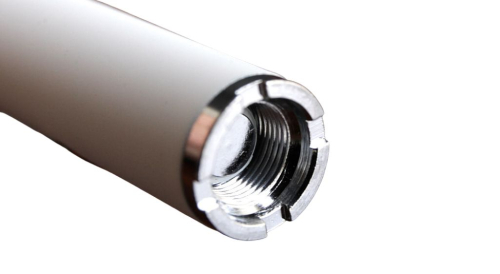
The threaded connection at the top with a spring-loaded center pin. The threading is 5mm diameter with 10 rotations (that’s where “510” comes from). The center pin makes electrical contact with your cartridge’s bottom contact point, completing the circuit that delivers power to the atomizer coil.
For a full breakdown of how the 510 standard works and why it became universal, see our 510 Thread Explained guide.
The Microcontroller
Higher-end batteries include a small chip that manages features like voltage selection (interpreting your button clicks), preheat mode timing, LED color codes, puff counting, and auto-shutoff timers. Budget batteries may use simpler analog circuits for basic functions.
Safety Features Explained
When a battery lists “safety features” in its product description, here’s what each one actually does and why it matters.
Overcharge Protection
What it does: Automatically stops the charging current when the cell reaches full capacity (4.2V).
Why it matters: Charging a lithium-ion cell beyond 4.2V causes lithium plating on the anode, which generates heat, reduces capacity, and in extreme cases can lead to thermal runaway — the term for when a cell heats itself uncontrollably. This is the mechanism behind battery fires.
How to verify: When your battery is fully charged, the LED should change color (usually to green) or turn off, and the device should stop drawing current. If you notice the battery getting warm even after the light says it’s full, something is wrong.
Priority level: Essential. Do not use a battery without this feature.
Over-Discharge Protection (Low Voltage Cutoff)
What it does: Shuts off the battery output when the cell voltage drops below a safe threshold (typically 2.7V–3.0V).
Why it matters: Draining a lithium cell below its minimum voltage causes irreversible chemical damage inside the cell. The cell loses capacity permanently, and in severe cases won’t accept a charge at all. This is what’s happening when a battery “dies” — the cell was discharged too deeply too many times.
How to verify: Your battery should stop producing vapor and blink an error code (usually 10+ rapid blinks) before it’s completely dead. If a battery lets you hit it until there’s absolutely zero output with no warning, it may lack this protection.
Priority level: Essential. Protects both the battery and your investment.
Short Circuit Protection
What it does: Instantly cuts power if the circuit detects an abnormal current path — which happens when the positive and negative terminals connect directly (a “short”).
Why it matters: A short circuit causes massive, instantaneous current flow, which generates extreme heat very quickly. In an unprotected battery, this can rupture the cell, cause fires, or in rare cases, cause the cell to vent hot gases. Short circuits can happen from a damaged cartridge, debris in the 510 connection, or a defective coil.
How to verify: If you connect a cartridge and the battery immediately blinks and refuses to fire, that’s short circuit protection doing its job. The battery detected something wrong and shut down.
Priority level: Essential. This is a fundamental safety feature.
Auto-Shutoff Timer
What it does: Automatically stops firing after a set duration of continuous use (typically 8–15 seconds, with 10 seconds being the most common).
Why it matters: Prevents the atomizer coil from overheating if you accidentally hold the button too long or if the button gets pressed in your pocket. Overheated coils can burn the oil, damage the cartridge, and in extreme cases overheat the battery cell.
How to verify: Hold the button for 10+ seconds. The battery should cut off and blink to indicate the auto-shutoff activated. If it keeps firing indefinitely, this feature is absent.
Priority level: Important. Especially for button-activated batteries.
Overcurrent Protection
What it does: Limits the maximum current the battery will deliver, even if the connected load demands more.
Why it matters: Different cartridges have different resistance levels, and some pull more current than others. If a very low-resistance cartridge (or a defective one) tries to draw more current than the cell can safely provide, overcurrent protection prevents the cell from being stressed beyond its rated capacity.
Priority level: Important. Particularly relevant if you use a variety of cartridge types and brands.
Reverse Polarity Protection
What it does: Prevents damage if the electrical connection is somehow reversed.
Why it matters: Less critical for 510 batteries than for devices with removable cells, but it’s still an indicator of thorough circuit design. Some cheap cartridges have poorly constructed contact points that can create unusual electrical conditions.
Priority level: Nice to have. Standard on quality brands, often absent on budget options.
Reading Battery Specifications
Here’s how to interpret the specs you’ll see on product listings and packaging.
| Spec | What It Means | What to Look For |
|---|---|---|
| Capacity (mAh) | How much charge the cell holds | 350–500mAh for portability, 650–1100mAh for all-day use |
| Voltage Range | Output voltage options for heating | Variable 2.0V–4.2V is most versatile |
| Threading | Connection type (should be 510) | 510 thread = universal compatibility |
| Charging Input | Charging port type and voltage | USB-C preferred, 5V/0.5A–1A input |
| Charging Time | Time from empty to full | 30–90 min typical depending on capacity |
| Resistance Range | Compatible cartridge resistance (ohms) | 1.0Ω–3.0Ω covers standard oil carts |
| Dimensions | Physical size | Smaller = more portable, larger = bigger battery |
| Material | Housing material | Aluminum or zinc alloy for durability |
| Activation | How firing is triggered | Button, auto-draw, or both |
Specs That Don’t Matter Much
Wattage claims: Some batteries list wattage, but for standard 510 oil cartridges, wattage isn’t a meaningful spec. Wattage matters for sub-ohm vaping and larger devices — for cart batteries, voltage and resistance are what determine your experience.
“Fastest charging” claims: Charging a lithium cell faster than it’s designed for shortens its lifespan. A 350mAh cell that charges in 15 minutes is being charged at a rate that stresses the cell. 30–45 minutes for a 350mAh cell and 60–90 minutes for a 650mAh+ cell are healthy rates.
RGB lighting and color options: Purely aesthetic. Don’t choose a battery based on how many LED colors it has.
How to Identify a Safe Battery
Not all 510 batteries are created equal. Here’s how to tell whether what you’re buying is properly engineered or cut-corner junk.
Buy from Established Brands
Brands like CCELL, Yocan, Ooze, Pulsar, Cartisan, and Randy’s have established manufacturing processes, quality control, and warranty programs. They use certified cells, proper protection circuits, and test their products before shipping.
This doesn’t mean every product from these brands is perfect — but it means there’s accountability and consistency.
Check for Certifications
Legitimate batteries will list one or more of these certifications on the packaging or product page:
CE marking — indicates conformity with EU health, safety, and environmental protection standards.
FCC certification — confirms the device meets electromagnetic interference standards (relevant for devices with microcontrollers).
RoHS compliance — certifies the product restricts hazardous substances like lead and mercury.
UL or equivalent testing — indicates the product has been independently tested for electrical safety.
Not every battery will have all of these, but reputable brands will have at least CE and RoHS. If a battery has zero certifications listed anywhere, that’s a red flag.
Avoid These Red Flags
Price under $8 from unknown brands. A quality 510 battery with proper protection circuitry, certified cell, and decent housing materials costs a minimum of ~$10 to manufacture and distribute. Batteries selling for $3–5 are cutting costs somewhere — and that somewhere is usually the protection circuit and cell quality.
No brand name or company information. If you can’t find who made the battery, you can’t verify its safety claims or file a warranty claim if something goes wrong.
Vague or missing specifications. Legitimate products list their capacity, voltage, charging specs, and safety features clearly. If a listing just says “510 battery, rechargeable” with no specs, move on.
Packaging with no safety warnings or regulatory information. Real products include basic safety info, recycling symbols, and manufacturer contact information.
Reviews mentioning overheating, swelling, or auto-firing. These are signs of fundamental safety failures in the circuitry or cell quality.
Common Battery Safety Myths
“All modern batteries have overcharge protection”
Most do. Not all. Batteries from reputable brands include overcharge protection as standard. Ultra-cheap batteries from unknown manufacturers sometimes skip it. Don’t assume — verify by checking specifications or watching the charging behavior (LED should change when full, and the device should stop drawing current).
“Vape batteries can explode”
The vast majority of vape battery incidents involve removable 18650 cells in mechanical mods — a completely different product category from 510 cart batteries. 510 batteries use sealed, integrated cells with (usually) built-in protection circuits. The risk is not zero, but it is extremely low with quality products used correctly. The few incidents that do occur almost always involve damaged batteries, wrong chargers, or extreme misuse.
“USB-C charges faster and is therefore more dangerous”
USB-C is a connector standard, not a charging speed. A well-designed USB-C charging circuit delivers the correct current for the cell size. USB-C is actually more reliable than Micro-USB because it has a more consistent connection and is less prone to the loose-fit charging issues that cause intermittent current delivery.
“Leaving the cart attached drains the battery dangerously”
Leaving a cartridge connected causes a very slow parasitic discharge — it drains the battery slightly over time but doesn’t create a safety hazard. It’s a maintenance concern (gradual discharge), not a safety concern. That said, it’s still best practice to detach carts during long-term storage. See our maintenance guide for details.
Safe Usage Practices
Even the best-engineered battery needs to be used correctly. Here are the non-negotiable safety practices.
Charging Safety
Use the included cable or a confirmed compatible replacement. Not all USB cables are equal — some deliver different amperages. The cable packaged with your battery is rated for its specific charging requirements.
Charge on hard, non-flammable surfaces. A desk, countertop, or table. Never on beds, couches, carpet, or near paper/fabric. Lithium cells generate heat during charging, and soft surfaces insulate that heat.
Don’t charge unattended for extended periods. Most 510 batteries charge in 30–90 minutes. Plug it in, check back in an hour, unplug when done. Don’t leave it charging all night.
Don’t charge in extreme temperatures. Below freezing or above 95°F stresses the cell. If your battery has been in a cold car, let it warm to room temperature before plugging in. For charging timing by battery size, see our charging guide.
Usage Safety
Turn off when not in use. Five clicks to power off. This prevents accidental firing in a pocket, bag, or on a surface.
Don’t use a visibly damaged battery. Dents, cracks, swelling, exposed wiring, or a battery that feels hot when idle are all signs to stop using it immediately.
Don’t modify or disassemble. 510 batteries aren’t designed to be opened, repaired, or modified. The sealed housing protects you from the lithium cell inside.
Keep away from water. Lithium cells and water don’t mix. If your battery gets submerged, don’t attempt to use or charge it — replace it.
Storage Safety
Store at room temperature (60–75°F). Extreme heat accelerates cell degradation. Extreme cold temporarily reduces capacity and stresses the cell when it returns to room temperature.
Don’t leave in vehicles. Car interiors regularly exceed safe temperature ranges in both summer and winter.
Keep away from metal objects. Loose batteries stored with keys, coins, or other metal objects can short-circuit if the contacts touch conductive surfaces. This is more relevant for batteries without attached carts, since the exposed 510 pin is a potential contact point.
Store away from children and pets. 510 batteries are small, often colorful, and can look like toys. Keep them in a drawer or case that’s out of reach.
When to Stop Using a Battery
Replace your battery immediately if you notice any of the following:
Physical swelling or deformation. A puffy or warped battery means the lithium cell is failing internally. This is a genuine safety hazard — stop using it, don’t charge it, and take it to a battery recycling center.
Unusual heat during use or charging. Warmth is normal. Hot is not. If the battery is uncomfortable to hold during normal use, something is wrong with the cell or circuitry.
Burning smell. Any chemical or electrical smell coming from the battery (not the cartridge) means internal damage. Stop immediately.
Auto-firing. If the battery activates on its own without button press or inhalation, the firing mechanism or circuitry has failed. This is rare but dangerous — remove the cartridge and dispose of the battery.
Won’t hold a charge. While not a safety emergency, a battery that drains within hours of a full charge has a degraded cell that’s only going to get worse. Time for a replacement.
For a full diagnostic walkthrough, see our troubleshooting guide.
Proper Battery Disposal
510 batteries contain lithium-ion cells that are classified as hazardous waste. Never put them in regular trash — lithium cells can short-circuit during compaction and cause fires in garbage trucks and landfills. This is a documented, ongoing problem.
Free recycling locations:
– Best Buy (battery recycling bins at every store)
– Home Depot and Lowe’s
– Staples
– Local hazardous waste collection facilities
– Some vape and smoke shops
Before disposing: Discharge the battery as much as possible, cover the contacts with electrical tape to prevent accidental shorts, and transport it in a non-conductive container (a small plastic bag works).
Frequently Asked Questions
How do I know if my battery has overcharge protection?
Any battery from a reputable brand (CCELL, Yocan, Ooze, Pulsar, Cartisan, Randy’s) includes it. The simplest test: plug it in and watch. The LED should change color or turn off when fully charged, and the device should stop pulling current. If the LED stays the same color indefinitely and the battery gets warm after several hours, it may lack this protection.
Is it safe to use a battery and cartridge from different brands?
Yes — that’s exactly what the 510 standard is for. Any 510-threaded cartridge works with any 510-threaded battery regardless of brand. The universal threading ensures mechanical compatibility, and the voltage ranges of standard 510 batteries (2.0V–4.2V) cover the operating requirements of all standard oil cartridges.
Can a 510 cart battery catch fire?
The risk is extremely low with quality products used correctly. Documented incidents almost exclusively involve damaged cells, wrong chargers, cheap batteries with no protection circuits, or extreme misuse. Using a reputable brand, the included charger, and basic safety practices (don’t charge unattended overnight, don’t use damaged batteries) makes the risk negligible.
What does it mean when my battery blinks rapidly?
Different blink patterns indicate different conditions — low battery, connection error, short circuit detection, or auto-shutoff activation. The specific pattern varies by brand. See our blinking lights guide for a brand-by-brand decoder.
Is USB-C safer than Micro-USB for charging?
Neither connector is inherently safer — safety depends on the charging circuit, not the plug shape. However, USB-C connections are physically more robust, less prone to wiggling loose mid-charge (which causes inconsistent current delivery), and are the modern industry standard. If you’re choosing between two otherwise similar batteries, USB-C is the better choice.
Should I buy a battery with a higher mAh for safety?
Higher mAh doesn’t affect safety — it affects battery life between charges. Safety is determined by the protection circuit, cell quality, and build quality. A 350mAh battery from CCELL with proper protections is safer than a 1000mAh battery from an unknown brand with no certifications.
Can I travel with a 510 battery on an airplane?
Yes, but it must go in your carry-on luggage — lithium batteries are prohibited in checked bags per FAA regulation. Remove the cartridge, turn off the battery, and ideally place it in a case. Note that THC cartridges should not be transported across state lines regardless of individual state laws.
How long should a 510 battery last before it needs replacing?
With proper care, 1–3 years depending on usage level. Heavy daily users may need to replace after 8–14 months; moderate users typically get 18–24 months. The first sign is usually reduced charge capacity — a battery that used to last 2 days but now needs daily charging has a degraded cell. See our maintenance guide for tips on extending lifespan.
Shop Batteries You Can Trust
Every battery we carry comes from established manufacturers with proper safety certifications and protection circuits:
CCELL Kap Battery — $34.99 — From the industry’s most trusted brand. Full protection suite, premium build quality, and CCELL’s engineering reputation behind it.
Yocan Kodo Star — $16.99 — USB-C charging, puff counter, variable voltage with full safety protections. One of the best-value batteries on the market.
Cartisan Pro Pen Neo 900mAh — $14.99 — 900mAh capacity with overcharge, over-discharge, and short circuit protection. CE and RoHS certified.
Continue Learning
Related guides:
- 510 Battery Maintenance & Care Guide
- 510 Thread Explained: Why It’s Universal
- How Long to Charge a Cart Battery
- Cart Battery Not Working? Troubleshooting Guide
- Blinking Lights Guide (All Brands)
- Best Voltage Settings for Vape Cartridges
- Preheat Function Explained

Written by Marc Pitts
Marc is the CEO of Discount Vape Pen and has spent over 11 years in the vape industry. He began his career owning and operating brick-and-mortar vape shops, giving him hands-on experience with both products and customer needs. A Kean University graduate from Westfield, NJ, Marc combines retail expertise with a deep understanding of the evolving vaping landscape.
Outside of work, Marc loves cooking Italian food, swimming, playing tennis, and attending Broadway shows — a true theater kid at heart. Meet all our Discount Vape Pen Authors here.